How To Operate Whirlpool Oven A Simple Step By Step Guide
Our complete guide to operating a Whirlpool oven makes cooking easy for beginners and seasoned home cooks alike. You will learn how to set the temperature, choose cooking modes, use the control panel, and maintain your oven for long-lasting performance. Follow our step-by-step instructions to bake, broil, roast, and self-clean like a pro.
Cooking with a Whirlpool oven is one of the best things you can do in your kitchen. These ovens are reliable, easy to use, and packed with features that make meal prep a breeze. Whether you are baking cookies, roasting a chicken, or broiling vegetables, a Whirlpool oven gives you the control you need.
But if you just bought a new Whirlpool oven or have never used one before, all those buttons and settings can feel overwhelming. That is exactly why we wrote this guide. We will walk you through every step of how to operate Whirlpool oven models with ease. By the end, you will feel confident and ready to cook.
In this article, we cover everything from turning the oven on to using advanced features like convection and self-clean. We also share practical tips, common mistakes to avoid, and expert advice. Let us get started and make your cooking experience simple and fun.
Key Takeaways
- Know Your Controls: Understanding the Whirlpool oven control panel is the first step to confident cooking.
- Master the Modes: Learn bake, broil, convection, and roast settings for every meal.
- Preheat Every Time: Always preheat your oven for even cooking and better results.
- Use the Self-Clean Feature: Keep your oven fresh with minimal effort using the built-in self-clean cycle.
- Position Racks Correctly: Proper oven rack placement changes how your food cooks dramatically.
- Safety First: Use the oven door lock and timer features to prevent accidents.
- Regular Maintenance: Clean your oven regularly to extend its life and improve performance.
📑 Table of Contents
- Understanding Your Whirlpool Oven Control Panel
- How to Preheat Your Whirlpool Oven
- Using the Different Cooking Modes
- Oven Rack Positioning and Placement
- Using the Timer and Oven Light
- Safety Tips for Operating Your Whirlpool Oven
- Common Mistakes to Avoid When Using Your Whirlpool Oven
- Cleaning and Maintaining Your Whirlpool Oven
- Expert Tips for Getting the Most Out of Your Whirlpool Oven
- Conclusion
Understanding Your Whirlpool Oven Control Panel
The first thing you need to do when learning how to operate Whirlpool oven is to understand the control panel. Every Whirlpool oven has a digital or dial-based interface that lets you set the temperature, cooking mode, and timer. Once you know what each button does, using the oven becomes second nature.
Digital Display vs. Dial Controls
Most modern Whirlpool ovens come with a digital display that shows the temperature, mode, and time. These models use touch buttons or a keypad. Older or simpler models may use a rotary dial. Both work great, but digital displays give you more precision and options.
Here is what you will typically find on a Whirlpool oven control panel:
- Temperature controls: Buttons or dials to set the desired oven temperature.
- Cooking mode selector: Lets you choose bake, broil, roast, or convection.
- Timer display: Shows the remaining cooking time or a countdown.
- Start/Stop button: Powers the oven on and off for the selected cycle.
- Self-clean button: Activates the oven self-clean cycle on compatible models.
- Oven light switch: Turns the interior light on to check your food.
How to Read the Display
When you first turn on your Whirlpool oven, the display will usually show the current temperature or a standby mode. To start cooking, press the mode button to select your cooking function. Then use the temperature buttons to set the heat level. The oven will beep when it reaches the set oven temperature. This is called preheating, and we will talk more about it next.
How to Preheat Your Whirlpool Oven
Preheating the oven is one of the most important steps in cooking. It ensures that your food starts cooking at the right temperature from the very beginning. Skipping this step can lead to unevenly cooked meals and longer cooking times.
Step-by-Step Preheating
Preheating a Whirlpool oven is simple. Follow these steps every time you cook:
- Turn on the oven using the power button or dial.
- Select your cooking mode, such as bake or roast.
- Set the desired temperature using the up and down buttons.
- Wait for the oven to beep or show a ready light on the display.
- Place your food inside and close the door firmly.
Most Whirlpool ovens reach the target temperature in about 10 to 15 minutes. Some newer models with convection technology heat up even faster because the fan circulates hot air evenly inside the oven cavity.
Why Preheating Matters
When you place food into a cold oven, it starts cooking slowly. This can change the texture and rise of baked goods like bread, cakes, and cookies. Baking settings especially depend on a preheated oven. The heat needs to surround the food immediately for the best results. So always wait for the preheat signal before putting your dish inside.
Using the Different Cooking Modes
One of the best things about a Whirlpool oven is the variety of cooking modes available. Each mode uses heat differently to suit specific types of food. Knowing when to use each mode will improve your cooking results dramatically.
Bake Mode
Bake mode is the most commonly used setting on any Whirlpool oven. It uses heating elements on both the top and bottom of the oven to create even, gentle heat. This mode is perfect for cakes, cookies, casseroles, and bread.
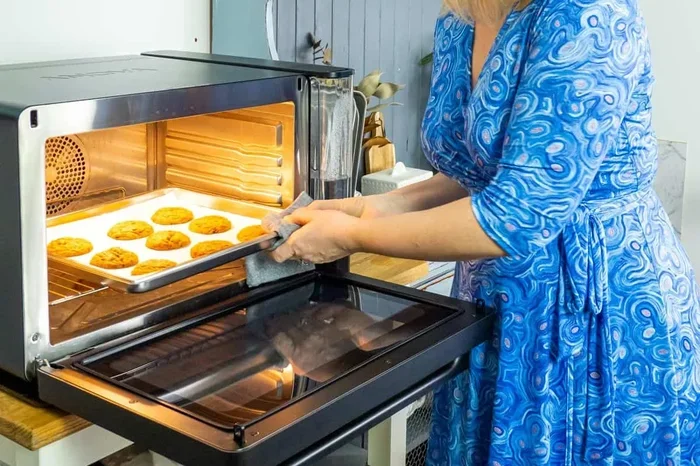
When using bake mode, set the temperature according to your recipe. Most baking recipes call for temperatures between 325°F and 375°F. Place your dish on the center oven rack for the most even heat distribution. Avoid opening the door too often, as this can cause temperature drops and affect your baked goods.
Broil Mode
Broil mode uses only the top heating element to produce intense, direct heat. This mode is ideal for browning the top of dishes, melting cheese, or getting a crispy finish on meats and vegetables.
Here are some quick tips for broiling:
- Always place food on the top oven rack, close to the heating element.
- Watch your food closely, as broiling cooks fast and can burn food quickly.
- Use a broil-safe pan or baking sheet to avoid melting or warping.
- Flip thicker foods halfway through for even browning.
Convection Mode
Convection mode uses a fan to circulate hot air throughout the oven cavity. This creates a more uniform cooking environment and can reduce cooking times by up to 25%. It is excellent for roasting meats, baking multiple trays at once, and making crispy roasted vegetables.
When you use convection, lower the temperature by about 25°F compared to regular bake mode. The fan-driven heat is more efficient, so your food will cook faster and more evenly. This is a great feature for anyone who loves meal prep or cooking for a large family.
Roast Mode
Roast mode combines top and bottom heat with a higher temperature setting. It is designed for larger cuts of meat, whole poultry, and hearty vegetables. The dry, intense heat caramelizes the outside while keeping the inside moist.
Use roast mode when cooking items like a whole chicken, a pork roast, or a beef brisket. Set the temperature based on your recipe and use a meat thermometer to check doneness. This mode works best when you keep the oven door closed for the entire cooking duration.
Self-Clean Mode
The self-clean cycle is a standout feature on most Whirlpool ovens. It heats the oven to extremely high temperatures, usually around 900°F, to burn off food residue and grease. What is left behind turns to ash, which you can easily wipe away.
To use self-clean mode, remove all racks and any large food debris from the oven. Close the door securely and press the self-clean button. The oven will lock automatically during the cycle, which typically lasts 2 to 4 hours. Once the cycle finishes and the oven cools down, wipe out the ash with a damp cloth.
Oven Rack Positioning and Placement
Where you place the oven rack has a huge impact on how your food cooks. Many people do not realize that rack position changes the cooking result. Getting this right is a simple way to improve your meals every time.
Best Rack Positions for Each Mode
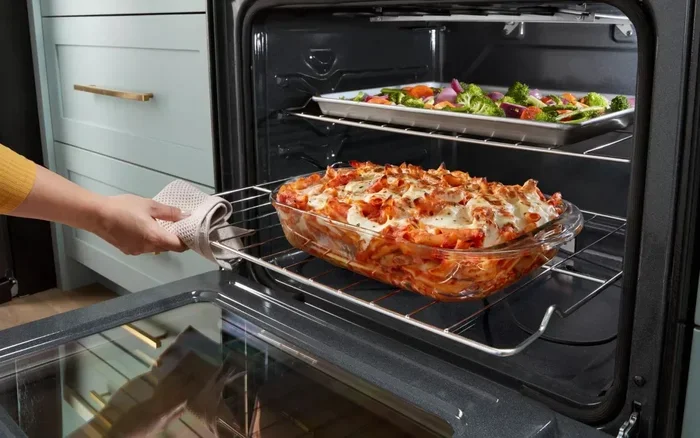
Here is a quick guide to oven rack placement:
- Center rack: Best for baking and roasting. It provides even heat from all sides.
- Top rack: Ideal for broiling. It puts food closer to the top heating element.
- Bottom rack: Useful for pizza or crusty bread that needs extra bottom heat.
- Lower third: Great for casseroles and dishes that need gentle, slow cooking.
Always make sure the rack is level and firmly seated in the grooves. A wobbly rack can cause uneven cooking or even accidents. If you are cooking multiple dishes at once, use the convection mode to ensure hot air reaches all trays evenly.
Using the Timer and Oven Light
Two simple features make operating your Whirlpool oven much easier: the oven timer and the interior light. These tools help you stay on top of your cooking without constantly opening the door.
Setting the Timer
The timer lets you set a countdown for your cooking time. You can use it independently of the oven temperature or pair it with a cooking cycle. When the timer goes off, the oven will beep to alert you. This is especially helpful when you are multitasking in the kitchen.
To set the timer, press the timer button and use the up or down arrows to choose the desired time. Some Whirlpool models allow you to set a delayed start, which is great for meal planning and kitchen appliance scheduling.
Using the Oven Light
The oven light lets you check on your food without opening the door. Opening the door releases heat and can affect cooking times, especially for delicate baked goods. Use the light button to peek at your dish and check for browning or doneness.
Safety Tips for Operating Your Whirlpool Oven
Safety should always come first when using any kitchen appliance. Whirlpool ovens are designed with built-in safety features, but it is important to follow best practices every time you cook.
Oven Door Lock and Child Safety
Many Whirlpool models include an oven door lock feature. This locks the door during the self-clean cycle and prevents accidental opening at high temperatures. If you have young children at home, consider using the child lock feature if your model supports it.
Handling Hot Surfaces
Always use oven mitts or heat-resistant gloves when touching the oven door, racks, or dishes. The exterior of the oven can also get warm during extended use, so keep towels and cloths away from the surface. Let the oven cool completely before cleaning or storing items inside.
Ventilation and Placement
Make sure your Whirlpool oven has enough space around it for proper ventilation. Do not place items on top of or directly against the oven during use. If your oven is built-in, ensure the installed ventilation meets the manufacturer’s guidelines. Good airflow helps the oven run efficiently and safely.
Common Mistakes to Avoid When Using Your Whirlpool Oven
Even experienced cooks make mistakes. Here are some common errors that can affect your results and the lifespan of your oven.
- Skipping preheat: This leads to uneven cooking and longer bake times.
- Overcrowding the oven: Too many dishes block airflow and cause uneven results.
- Using the wrong rack position: Wrong placement can burn or undercook food.
- Opening the door too often: Each opening drops the temperature significantly.
- Ignoring the self-clean cycle: Built-up grease and residue can cause odors and smoke.
- Not calibrating the temperature: Over time, ovens can drift from their set temperature.
Avoiding these simple mistakes will help you get better results and keep your oven running smoothly for years.
Cleaning and Maintaining Your Whirlpool Oven
Regular maintenance keeps your Whirlpool oven performing at its best. A clean oven cooks more evenly, smells better, and lasts longer. Here is how to keep yours in top shape.
Daily Cleaning Habits
After each use, wipe down the interior with a damp cloth while the oven is still warm. This makes it easy to remove spills and crumbs before they harden. Clean the oven racks periodically with warm soapy water and a non-abrasive sponge.
Deep Cleaning with Self-Clean
Use the self-clean cycle every few months or whenever you notice heavy buildup. Run the cycle in a well-ventilated area, as it can produce some smoke and odor during the process. After the cycle completes and the oven cools, wipe out all ash residue with a soft, damp cloth.
Exterior Care
Wipe the exterior of your Whirlpool oven with a mild cleaner and a soft cloth. Avoid harsh chemicals or abrasive scrubbers that can damage the finish. Clean the glass door regularly so you can easily see inside while cooking.
Expert Tips for Getting the Most Out of Your Whirlpool Oven
Here are some pro tips from experienced cooks that will take your oven game to the next level.
- Use an oven thermometer: This helps you verify that your oven is heating to the correct temperature.
- Rotate dishes halfway: This compensates for any hot spots and ensures even cooking.
- Invest in quality bakeware: Dark pans absorb more heat, while light pans reflect it. Choose based on your recipe.
- Let the oven recover: If you open the door, give it a minute to return to temperature before putting food back in.
- Use parchment paper: It prevents sticking and makes cleanup much easier after every bake.
These small habits add up over time and make a big difference in the quality of your cooking. Once you make them part of your routine, you will wonder how you ever cooked without them.
Conclusion
Learning how to operate Whirlpool oven does not have to be complicated. With a little practice and the knowledge from this guide, you will be cooking delicious meals with confidence in no time. From understanding the control panel to mastering bake, broil, convection, and self-clean modes, every feature is designed to make your life easier.
Remember to always preheat, position your racks correctly, and use the timer to stay on track. Keep your oven clean and well-maintained, and it will serve you well for many years. Whether you are a beginner or a seasoned home cook, your Whirlpool oven is a powerful kitchen appliance that can help you create amazing meals every single day.
Now that you know the basics, go ahead and try a new recipe. Experiment with different cooking modes and find what works best for you. The more you use your Whirlpool oven, the more comfortable and skilled you will become. Happy cooking!
Frequently Asked Questions
How do I turn on my Whirlpool oven?
To turn on your Whirlpool oven, press the power button or rotate the dial to the desired cooking mode. Select your temperature using the up or down buttons, and press start. The oven will begin preheating and will beep when it reaches the set temperature.
What is the difference between bake and broil on a Whirlpool oven?
Bake mode uses heat from both the top and bottom elements for even, gentle cooking, making it ideal for cakes and casseroles. Broil mode uses only the top heating element to produce intense, direct heat, which is perfect for browning and crisping the top of dishes.
How long does the self-clean cycle take on a Whirlpool oven?
The self-clean cycle on most Whirlpool ovens takes between 2 and 4 hours depending on the level of buildup. The oven locks automatically during the cycle for safety. Once complete, let the oven cool and wipe out the ash residue with a damp cloth.
Can I use convection mode for all types of cooking?
Convection mode works great for roasting, baking, and cooking multiple dishes at once. However, it is not recommended for delicate items like souffles or custards, where the fan can cause uneven results. Use regular bake mode for those recipes instead.
Why is my Whirlpool oven not heating to the right temperature?
This can happen over time due to temperature drift. You can use an oven thermometer to check the actual temperature inside. If there is a significant difference, you may need to recalibrate your oven or contact a Whirlpool service technician for assistance.
How often should I clean my Whirlpool oven?
You should wipe the interior after every use to prevent buildup. Use the self-clean cycle every 2 to 3 months or whenever you notice heavy grease or food residue. Regular cleaning keeps your oven performing efficiently and prevents odors.